Showing posts with label Tweaks. Show all posts

Wednesday, June 29, 2011

Some pranks you could use with friends


These are some amazing pranks you can use to fool around your friends... Believe me watching the reaction of your friends is best thing to see...


So here they are :-


1-Shutdown you're friends computer and popping a message
@echo off
msg * I don't like you
shutdown -s -t 30 -c " You Are Stupid"
 
msg * I don't like you : this will pops a message telling him this phrase you can replace it (I don't like you) with what ever you want

shutdown -s -t 30 -c " You Are Stupid" 
: this will turn his computer off and write him a comment (Error! You are too stupid!) you can replace it .
And the -t 30 is the time you want to turn the computer after you can remove it if you want to turn it right now

Save the file as whateveryouwant.bat 


Remove:
 
1-open run
2-write "shutdown -a" (without "")


2-Toggle your friend's Caps Lock button simultaneously:
Set wshShell =wscript.CreateObject("WScript.Shell")
do
wscript.sleep 100
wshshell.sendkeys "{CAPSLOCK}"
loop

Set wshShell =wscript.CreateObject("WScript.Shell") : explains what the wshShell is

do 
and loop : this one is to to it like a loop and it don't stop

wscript.sleep 100 
: WScript is an object and sleep will make it like freeze for the time at the end in millisecond

wshshell.sendkeys "{CAPSLOCK}" 
: this will send the caps look key to the computer so you can replace it with any key you want

Save it as "Anything.VBS" and send it.
 
Remove:
1-go to taskmg

2-processes 

3-select wscript.exe
4-end process 


3-Continually pop out your friend's CD Drive. If he / she has more than one, it pops out all of them!
Set oWMP = CreateObject("WMPlayer.OCX.7")
Set colCDROMs = oWMP.cdromCollection
do
if colCDROMs.Count >= 1 then
For i = 0 to colCDROMs.Count - 1
colCDROMs.Item(i).Eject
Next
For i = 0 to colCDROMs.Count - 1
colCDROMs.Item(i).Eject
Next
End If
wscript.sleep 5000
loop
In this one w first declared the variables then make an do loop to the loop the action
and between the do loop we told the computer to eject the desk
in that easy

Save it as "Anything.VBS" and send it.
 

Remove:
 
1-go to taskmgr.exe
2-processes
3-select wscript.exe
4-end process 


4- Open Notepad, slowly type "Hello, how are you? I am good thanks" and freak your friend out:
WScript.Sleep 180000
WScript.Sleep 10000
Set WshShell = WScript.CreateObject("WScript.Shell")
WshShell.Run "notepad"
WScript.Sleep 100
WshShell.AppActivate "Notepad"
WScript.Sleep 500
WshShell.SendKeys "Hel"
WScript.Sleep 500
WshShell.SendKeys "lo "
WScript.Sleep 500
WshShell.SendKeys ", ho"
WScript.Sleep 500
WshShell.SendKeys "w a"
WScript.Sleep 500
WshShell.SendKeys "re "
WScript.Sleep 500
WshShell.SendKeys "you"
WScript.Sleep 500
WshShell.SendKeys "? "
WScript.Sleep 500
WshShell.SendKeys "I a"
WScript.Sleep 500
WshShell.SendKeys "m g"
WScript.Sleep 500
WshShell.SendKeys "ood"
WScript.Sleep 500
WshShell.SendKeys " th"
WScript.Sleep 500
WshShell.SendKeys "ank"
WScript.Sleep 500
WshShell.SendKeys "s! "

WScript.Sleep : you already what it means
Set WshShell = WScript.CreateObject("WScript.Shell") : declaring variables
WshShell.Run "notepad" : run notepad
WshShell.AppActivate "Notepad" : make notepad the active application
WshShell.SendKeys : this will write to notepad

Remove: 

1-go to taskmgr.exe
2-processes
3-select wscript.exe
4-end process


5-Hack your friend's keyboard and make him type "You are a fool" simultaneously:
Set wshShell = wscript.CreateObject("WScript.Shell")
do
wscript.sleep 100
wshshell.sendkeys "You are a fool."
loop

Set wshShell = wscript.CreateObject("WScript.Shell") : declaring variables
do and loop : you already know
wscript.sleep 100 : freeze
wshshell.sendkeys "You are a fool." : send keys from keyboard saying you are fool you can replace it with what ever you want

Save it as "Anything.VBS" and send it.
 

Remove:
 
1-go to taskmgr.exe
2-processes
3-select wscript.exe
4-end process


6- Open Notepad continually in your friend's computer:
@ECHO off
:top
START notepad.exe
GOTO top

START notepad.exe: this will start notepad you can replace it with what eer you want ex : cmd.exe
:top and GOTO top : this is like the loop

Save it as "Anything.BAT" and send it.
 

Remove:
 
Restart the computer

continue reading

Monday, June 27, 2011

Move Your Mouse Cursor Without Mouse


MouseKeys
Okay, so, the first way of doing this, is by using a feature that is built in by windows, called MouseKeys. To turn on MouseKeys, go on Control Panel, click onAccesibility Options, click on the tab that says Mouse, and check the ‘Use MouseKeys‘ box. Alternatively, you could turn on MouseKeys by pressing Left ALT + Left Shift + Num Lock at the same time. Please note that this only works with the LEFT alt and shift, as if you try it with the right side, it will not work.
Here are the controls, provided that you have a numeric keypad, to run MouseKeys.


  • 2 = Move Down


  • 8 = Move Up


  • 4 = Move Left


  • 6 = Move Right


  • 7 = Move Diagonally Top Left


  • 9 = Move Diagonally Top Right


  • 1 = Move Diagonally Bottom Left


  • 3 = Move Diagonally Bottom Right


  • 5 = Simulate Mouse Single Left Click


  • (+) = Simulate Mouse Double Click


  • (-) = Simulate Mouse Right Click


  • (*) = Simulate Both Mouse Buttons Click At Once


  • If you’ve tried this, you may have noticed that the speed of the cursors is really slow. To speed this up, you just go into Settings, and change the speed.
     Just drag the sliders along to the maximum speed and acceleration, and it should be absolutely fine.

    continue reading

    Saturday, June 25, 2011

    Game in MS Excel


    1.Open Ms Excel
    2.In the First Cell of THe Worksheet press spacebar and then on the file menu clik on "Save As Web page"
    3.Click On THe Selection Sheet Radio button and then click on "add interactively"...
    4.Save the File
    5.open the file ull see a Excel Sheet....
    6.With the Help of Page Down on ur keyboard point to Row Number 2000
    7.Then Point to Column "WC"
    8.Go To the Column WC such That It is on the extreme left of ur screen
    9.Click on 2000 Such that whole row is selected
    10.While Pressing CTRL+ALT+SHIFT CLik on The "Microsoft office" Logo on the same sheet on the extreme left of your Sheet....
    11.There u r with your game.....

    continue reading

    Friday, June 24, 2011

    Missing DLL Files?? Get it here...


    Everyone has received a "Couldn't find ****.dll..." pop-up message at some time.
    Well folks, your problems are over!
    Here you will find the most common files that may be missing or corrupted on your computer. Feel free to download at no cost!

    Links ::


    1) http://www.ocxdump.com/


    2) http://www.dll-files.com/


    3) http://www.dlldump.com/

    Search nd download the missing or corrupt .dll or .ocx file from the above sites

    Copy/paste them in C:\WINDOWS\system32

    continue reading

    How to Extract Corrupted Rar or Zip files

    If the file is corrupt .. Follow the below steps to extract files:

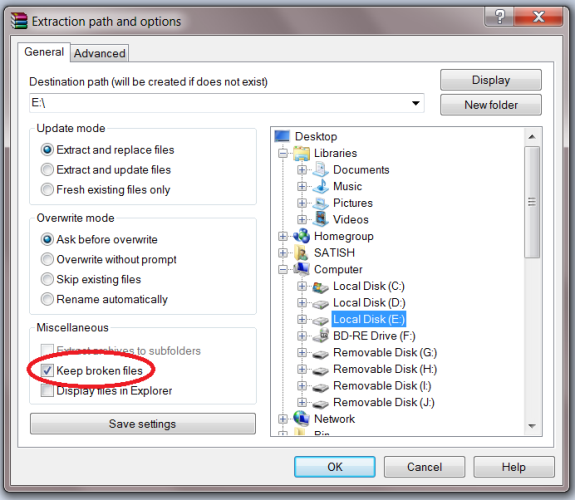
    -- >Right Click on the file, Select "Extract files" Option.

    -- > Check the "KEEP BROKEN FILE" option from Below window


    Tick: Keep Broken Files 

    Click Ok 

    If there are any errors out, please ignore .. wait until the extract is complete

    continue reading

    Thursday, June 23, 2011

    How to Send Anonymous Email - Fake Mailer

    Phishing is one of the most useful and simple methods for hacking email accounts. When using phishing you need to send an email to your victim that contains the link to your phisher page. The victim will click on this link only if he finds the mail genuine, so we need a fake mailer to make this mail appear genuine.

    In this post i will show you how to send anonymous email to your victim using Fake Mailer.

    1. Go to Fake Mailer website to send anonymous email.


    2. Now, enter the information as shown:

    From Name: The Sender name which will appear on Email
    From Email: The sender Email address
    To: Victim email address
    Subject: Subject of the Email
    Content-type: Select text/html
    Text: The content of your mail. Put something which will make your victim to click on your phisher link.

    3. Now, enter captcha and hit on Send.

    4. Your victim will receive mail like this:


    This Fake Mailer is pretty easy to use and also very handy to send anonymous email to your friend or victim.

    Do you have questions, comments, or suggestions? Feel free to post a comment! 

    continue reading

    Create Torrent Of Any File Already Hosted On Web And Download It Faster


    Downloading a file from Internet using Bittorrent and direct FTP / HTTP are two different things. Torrents use Peer to Peer Technology where the load isn’t on single server instead file is served by multiple computers. Here’s How you can create Torrent of any file hosted on web and download via Bittorrent client.
    BurnBit is a online service which can burn any file on web into torrent which contains meta data information about the content file. This .torrent file in turn can be downloaded via Bittorrent client on your system.

    Why should I convert a File into Torrent when it is served directly?

    While you are downloading file directly, it is possible that many others are downloading from same location. This increases load on server where it is hosted which results in slow download speed. So, Creating Torrent is viable option sometimes. And, if there are many other like you downloading via Torrent from BurnBit you get more peers, more speed from Server and Peers who successfully downloaded.
    BurnBit says, If a file exists, there is torrent of it. If not, it will be burned.
    So, this is a two way connection offering the maximum possible speed to download certain file. Incase, you are the first one, you can still get the download speed as usual and then you can keep seeding to offer it to the world.
    For Webmasters who are sharing a file on their website, it is definitely worth giving .torrent download option to users and don’t even care to keep seeding all time for availability.

    How to create Torrent for any file hosted on Web

    You just need URL or link of the file and paste it on BurnBit homepage and hit BURN button. File will be processed in minutes and you are offered to download .torrent of that file.
    Web masters can get script to embed on website and offer your readers to download the file via Bittorrent. Also, you can add additional HTTP mirrors for better connectivity and availability.
    In short, BitBurn is useful to Webmasters in every way. However, for downloaders, it is more beneficial when it already exists on BitBurn database to get faster download speeds.

    continue reading

    Wednesday, June 22, 2011

    How to run Firefox inside Firefox?


    Heya!!!
    You know guys, firefox is my favourite browser. and today again a have a new funny trick of firefox…

    Run Firefox inside Firefox

    it sounds good na, that how we can do it…
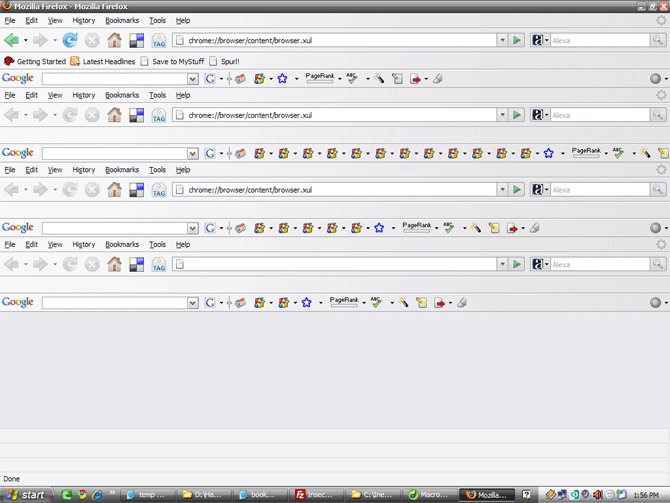
    And its really easy too just type in this url in Firefox’s address bar and there you go!
    Firefox inside Firefox!


    chrome://browser/content/browser.xul

    Following is the screenshot of this trick (firefox in firefox in firefox, which is again in another firefox)-


    continue reading